
 We have started using Amazon S3 to store many of the files our various websites use. This cuts down the demand on our own server and, alongside the Cloudfront service, offers improved website performance.
When uploading your files to Amazon S3 make sure that you allow all users to have read access to the files. Otherwise, your website content won’t be displayed properly – you may see HTTP 403 errors returned (suggesting that the file is not available without logging in).
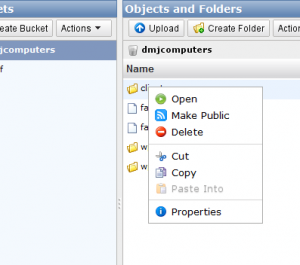
You can make your files accessible by selecting each folder in your S3 bucket, right-clicking, and selecting the ‘Make Public’ option.
It’ll take a while if you have many website files, and please make sure that you only select this option for the files that you want everyone to be able to read.
You could also use other CDN services (such as MaxCDN) or combined protections and performance services such as CloudFlare if you are worried your site might not handle traffic peaks.
If you found this post useful, please reward us by sharing or liking it (see below). It’s quick and easy and helps motivate us to write more.




Good call on the Amazon S3… I’ve never looked back
Wierdly, the AWS Documentation and User Guides do not mention the Make Public step anywhere, yet the website will not work without it.