
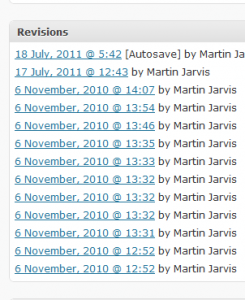
 WordPress saves copies of your content every time you update a page or a post, and auto-save revisions are taken while you are editing content too. These ‘revisions’ are then displayed towards the bottom of the page when you are viewing or editing your content and can be used to compare changes between 2 different versions, to see who made changes to your content (in a multi-author site), and to restore to a previous version of your content if you have really messed up.
This is really useful, but the overhead in your WP database can get quite high if you frequently edit posts and pages, as there is no automatic culling of revisions built into a WordPress install.
There are a few ways you can keep the number of revisions in check. The way I prefer is to edit your config.php file to include the following couple of lines…





I personally hate when revisions are disabled. I write for one or two blogs that have completely disabled them and it is very frustrating. Firstly, because from time to time I will lose a connection and lose all my work. And secondly, because I am unable to refer back to previous drafts. I believe a few drafts are best and you can then periodically delete old drafts that are not necessary.
Thanks for commenting. I agree that disabling revisions isn’t a good idea, but reducing them to a reasonable number is useful. Most WordPress website owners don’t go back and clear them up, which can cause database clutter.