
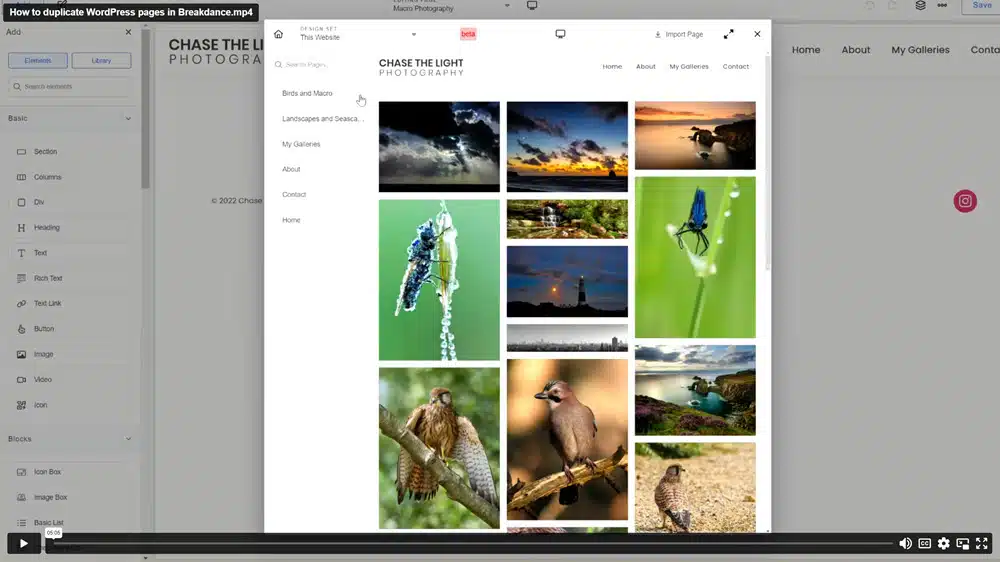
It’s not always obvious how to duplicate a page in WordPress when using the Breakdance plugin. There aren’t the usual copy/paste options available that you get with the WordPress block editor.
So, we recorded a quick screengrab video to show how to do it, by creating a new page and then selecting an existing page as a library item to insert into the new page.
If you want some help with your Breakdance website, please get in touch. Our agency works pretty much 100% with WordPress websites. We’ve seen, and helped resolve, all sorts of problems.




I do not have the option to import page.
I’m not sure why you cannot see the ‘Import Page’ link. It’s possible that it doesn’t work for posts, although I’m not sure why? Can you confirm that you’re trying to copy a page and not a post?
If you don’t see it you may have to dig a little further. Once in breakdance in a blank page click add then you will see Elements and Library. Choose library. Then you will see a list of pages. Choose the page you want to duplicate then the import page button will be up top. Click it then save your page. Done